Google Stitch Every designer knows the feeling. You have a vivid product idea in your head, but translating it into an actual interface takes days of wireframing, iterations, and back-and-forth with developers. What if you could simply describe what you want and watch it appear on screen in under two minutes?
Table of Contents
Wall Street noticed immediately. Figma shares dropped 8% on Wednesday following the announcement, marking the steepest single-day fall in over a month.Whether you are a solo founder building your first product, a developer tired of handoff friction, or a designer looking to explore dozens of directions quickly, Stitch deserves your attention right now.
What Exactly Is Google Stitch?
Stitch by Google is an AI-powered UI design tool introduced at Google I/O 2025 and now available through Google Labs. Users can turn text prompts or image inputs into responsive user interfaces and frontend code for web and mobile apps.
It was born of an idea between a designer and an engineer, both looking to build a product that optimised their respective workflows. It leverages the multimodal capabilities of Gemini 2.5 Pro to create a more fluid and integrated workflow between design and development.
Think of it as the bridge between the moment an idea forms and the moment a developer can actually build it. That gap, which traditionally swallowed weeks of effort, is now measured in minutes.
The Big March 2026 Redesign: What Changed?
Google has evolved Stitch into an AI-native software design canvas. With it, anyone can create, iterate, and collaborate to turn natural language into high-fidelity UI designs.
This is not a minor update. The entire product has been rethought from the ground up.
An Infinite Canvas Built for Ideas
The new Stitch canvas features an AI-native, infinite canvas that gives your ideas room to grow from early ideations to working prototypes. It allows you to bring your ideas regardless of the shape they take, whether images, text, or even code, directly to the canvas as context.
This matters more than it might initially seem. Traditional design tools force you to commit to a direction early. Stitch lets you think in parallel, sprawling across the canvas the way you would on a whiteboard.
Voice Input and Real-Time Critique
Voice input adds a new dimension to the workflow, letting users direct the design agent through spoken commands rather than typed prompts. You can speak directly to your canvas, and the agent can give real-time design critiques, design a new landing page by interviewing you, and make real-time updates.
This is a genuinely interesting shift. Describing design choices verbally often feels more natural than typing them, and Stitch now accommodates that instinct.
A Design Agent That Thinks Across Your Whole Project
At the centre of the update is a design agent that can reason across an entire project’s evolution. It handles layout decisions, component selection, and iterative refinement based on context from prompts, screenshots, code snippets, and competitor UI references fed into the canvas simultaneously.
When you want to explore more directions, a new Agent Manager tracks your progress and helps you work on multiple ideas in parallel, all while staying organised.
DESIGN.md: A Portable Design System
DESIGN.md file support broadens the design system toolkit, letting users extract a design system from any URL or export and import design rules to and from other design and coding tools through an agent-friendly markdown file. Designers can apply existing design systems to new Stitch projects without starting from scratch each time.
For teams with established brand guidelines, this is a meaningful feature. Your design rules travel with you rather than getting reinvented with every new project.
Core Features Worth Knowing About
Text to UI in Plain English
You can describe your interface in plain English. For example, “a mobile delivery app with a white background, orange accents, and card-style restaurant listings.” From that, Stitch generates a complete layout with multiple screens, branding colours, and components.
Upload a Sketch or Screenshot
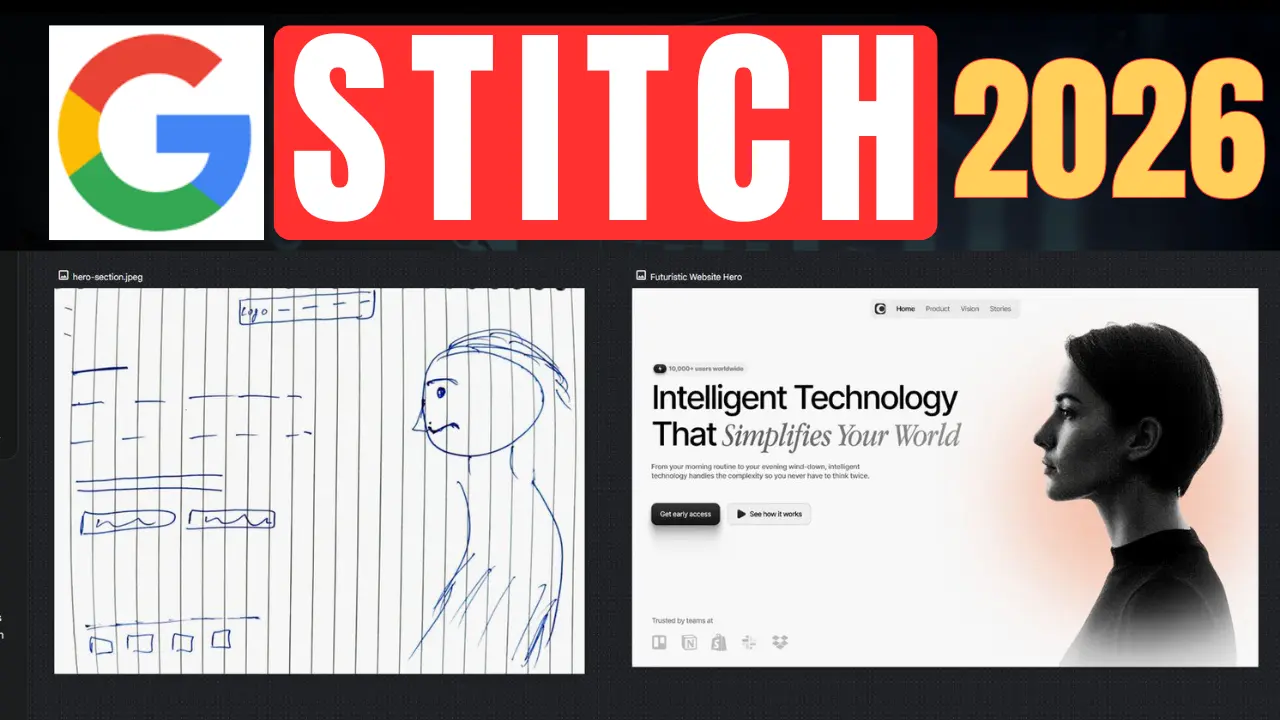
Have a design sketch on a whiteboard, a screenshot of a compelling UI, or a rough wireframe? Upload it to Stitch. It processes the image to produce a corresponding digital UI, bridging your initial visual ideas to a functional design.
Instant Interactive Prototypes
Stitch converts static designs into clickable prototypes in a single step and can suggest what the next screen should look like. You can stitch screens together in seconds and simply click “Play” to quickly preview your interactive app flow.
Export to Figma and Code
Your generated design can be seamlessly pasted to Figma for easy further refinement, collaboration with design teams, and integration into existing design systems. Stitch also generates clean, functional frontend code based on your design, so you have a fully functional UI ready to go.
At the bottom of the platform, Stitch will generate TypeScript for a user’s app or HTML and CSS for web page design.
How the Two AI Modes Differ
Users can choose between two AI models. Gemini 2.5 Flash in Standard Mode handles fast, lightweight design generation at up to 350 generations per month. Gemini 2.5 Pro in Experimental Mode delivers higher-quality, more detailed designs at up to 50 generations per month.
For day-to-day ideation and quick explorations, Standard Mode is more than sufficient. When you are preparing something close to final for a client or stakeholder presentation, Experimental Mode gives you the extra polish worth spending your quota on.
Developer Integration: Stitch Talks to Your Coding Tools
This is where Stitch moves beyond being a design toy and into professional territory.
A new SDK and MCP server connect Stitch to coding assistants including Claude Code, Gemini CLI, and Cursor for seamless design-to-code workflows.
Using the recently released Stitch MCP server and SDK, you can leverage Stitch’s capabilities via skills and tools, or export your designs to developer tools like AI Studio and Antigravity, ensuring that the partnership between you, the AI, and your developers remains seamless and synchronised.
The design-to-development handoff has historically been one of the most friction-heavy parts of any product build. Stitch is making a serious attempt to collapse that gap entirely.
What “Vibe Design” Actually Means
Google calls its approach “vibe design,” letting developers describe business objectives instead of drawing wireframes. Google product manager Rustin Banks described how AI has transformed software development from written descriptions into functional code.
It is an example of how different jobs and tasks are shifting from having a human figure everything out to outsourcing some of that to an AI co-worker.
The name is deliberately casual, but the concept is serious. Intent-driven design means you say what you want the product to do and feel, rather than specifying every pixel. The tool interprets your intent and makes the visual decisions.
Honest Assessment: Where Stitch Shines and Where It Struggles
No tool is perfect, and Stitch is no exception.
Where it works well:
- Rapid early-stage ideation, getting ideas out of your head and onto a screen quickly
- Mobile app layouts, which it handles more consistently than complex web flows
- Teams with non-designers who need to communicate visual concepts
- Developers who want to prototype before engaging a designer
Where it still needs work:
The results can be inconsistent. Components do not always align, colours drift from brand systems, and complex flows still need human intervention to feel cohesive.
One of Stitch’s most noticeable weaknesses is how it handles image inputs. Despite claiming to support sketch-based uploads, it can struggle to accurately interpret hand-drawn flows.
The honest framing, as one designer put it, is that Stitch is not about handing you a finished design. It is about getting you out of the blank-canvas problem faster.
Is Google Stitch Free?
Yes, Google Stitch is currently free as part of Google Labs. There is no paid plan or usage fee, but generation limits apply depending on the mode used.
Given that you receive up to 350 Standard generations per month, most individuals and small teams will find the free tier more than sufficient for regular use.
Access it directly at stitch.withgoogle.com using any Google account. No installation required.
FAQ Section
Q: What is Google Stitch and who is it for? A: Google Stitch is a free, web-based UI design tool from Google Labs. It is built for designers, developers, founders, and product teams who want to go from an idea to a visual interface quickly without deep design expertise.
Q: Do I need design experience to use Google Stitch? A: No. You describe what you want in plain English and Stitch generates the layout. Basic familiarity with design concepts helps when refining outputs, but it is not a prerequisite to get started.
Q: How is Google Stitch different from Figma? A: Figma is a professional design tool built for precision and collaboration at scale. Stitch is focused on rapid generation from natural language, with Figma integration as an export option. They are complementary rather than direct replacements for most professional workflows.
Q: Can I export Stitch designs as code? A: Yes. Stitch exports HTML and CSS for web designs and TypeScript for app interfaces. You can also paste directly into Figma for further editing or hand off to developers through integrations with tools like Cursor and Claude Code.
Q: What are the monthly generation limits on Google Stitch? A: Standard Mode using Gemini 2.5 Flash allows up to 350 generations per month. Experimental Mode using Gemini 2.5 Pro allows up to 50 generations per month. Both are included in the free tier.
Q: Can teams collaborate inside Google Stitch? A: Yes. The 2026 update added collaborative features through the Agent Manager. Multiple team members can work on parallel design explorations simultaneously, with the design agent tracking progress across different directions.
Q: Is Google Stitch only for mobile apps? A: No, it supports both mobile and web UI generation. However, reviewers generally note that it performs more consistently with mobile app layouts than with complex multi-section web designs.
Join for more update and get real-time alerts here: t.me/DailyKoinUpdate
You May Also Read:
- ego price
- SASUF-NRF Seed Grants 2026: Eligibility, Funding, Deadlines and Full Application Guide
- How to Install Claude Code on Ubuntu Linux 2026:The Ultimate Setup Guide for High Velocity AI Engineering
- How I Turned Claude and Obsidian into a Self-Running Business Brain (And You Can Too)
- Best GitHub repos for Claude code that will 10x your next project